
Streaming IPTV content has become one of the most popular ways to enjoy live TV, movies, sports, and entertainment channels worldwide. Among the many IPTV players available today, IBO Player has gained huge popularity because of its smooth streaming experience, modern interface, and easy setup process.
Many beginners often struggle during the first-time setup because they do not know how to properly activate the application. If you are one of them, this complete guide will help you understand everything about IBO Player, including its features, benefits, activation process, and troubleshooting tips.
By the end of this guide, you will know exactly how to activate IBO Player quickly and start streaming your favorite IPTV content without any issues.
What is IBO Player
IBO Player Official Website is a premium IPTV media player designed for users who want a stable and high-quality streaming experience. The app itself does not provide channels or subscriptions. Instead, it allows users to add IPTV playlists from their IPTV service providers.
IBO Player supports multiple devices, including Smart TVs, Android devices, and streaming boxes. Its simple design and fast performance make it one of the preferred IPTV players among users worldwide.
Unlike traditional cable TV services, IPTV allows users to stream content over the internet. This means you can access live TV, movies, and series directly through your internet connection using applications like IBO Player.
Why is IBO Player So Popular?
IBO Player has become popular because it combines speed, stability, and premium streaming features in one application. Many IPTV users prefer it over other players because of its modern interface and reliable playback system.
Main Reasons Users Choose IBO Player
- Smooth and stable streaming experience
- Supports 4K Ultra HD streaming
- Fast channel loading speed
- User-friendly interface
- Multi-language support
- Playlist management system
- VLC player integration
- Supports different video formats
- Easy activation process
- Works on multiple devices
Another major reason behind its popularity is the 7-day free trial offered to users. This allows beginners to test the app before purchasing activation.
Important Things You Should Know Before Using IBO Player
Before you activate IBO Player, there are some important things every user should understand. Many people misunderstand how IPTV players work, which creates confusion during setup.
IBO Player is only a media player application. It does not provide any channels, movies, TV shows, or IPTV subscriptions. To watch content, users must first get IPTV service details from an external IPTV provider.
Before Activation, Make Sure You Have
- A stable internet connection
- Smart TV or supported device
- IPTV subscription from a provider
- M3U playlist URL or Xtream Codes
- Device ID and Device Key
- Official IBO Player application installed
It is also important to avoid fake websites claiming to be official IBO Player platforms. Many unauthorized websites attempt to mislead users.
The only official website is:
Always download the application and manage playlists through the official website for security and proper functionality.
Features of IBO Player
IBO Player offers several advanced streaming features that improve the overall IPTV experience. These features make the application suitable for both beginners and experienced IPTV users.
Top Features of IBO Player
1. 4K Streaming Support
IBO Player supports Ultra HD and 4K streaming quality for supported content and devices.
2. Fast Streaming Technology
The app is optimized for faster loading and minimal buffering.
3. Multiple Themes
Users can choose from different themes to customize the appearance of the application.
4. VLC Media Player Support
Built-in VLC integration improves playback compatibility for many formats.
5. Multi-Language Interface
The application supports multiple languages for international users.
6. Movie Posters and Trailers
IBO Player displays posters and trailers for better content browsing.
7. Supports Multiple Formats
The app works with various audio and video file formats.
8. Playlist Management
Users can easily add, edit, and manage IPTV playlists.
9. Local Media Playback
IBO Player can also manage local media files stored on the device.
How to Activate IBO Player in 5 Easy Steps
Setting up IBO Player is simple if you follow the correct process carefully. Below is the complete step-by-step activation guide for beginners.
Step 1 – Install IBO Player on Your Device
The first step is downloading and installing the IBO Player application on your Smart TV or supported streaming device.
You can usually find the application inside:
- Samsung Smart TV App Store
- LG Content Store
- Android TV Play Store
- Amazon Firestick apps section
Always make sure you install the official version of the application.
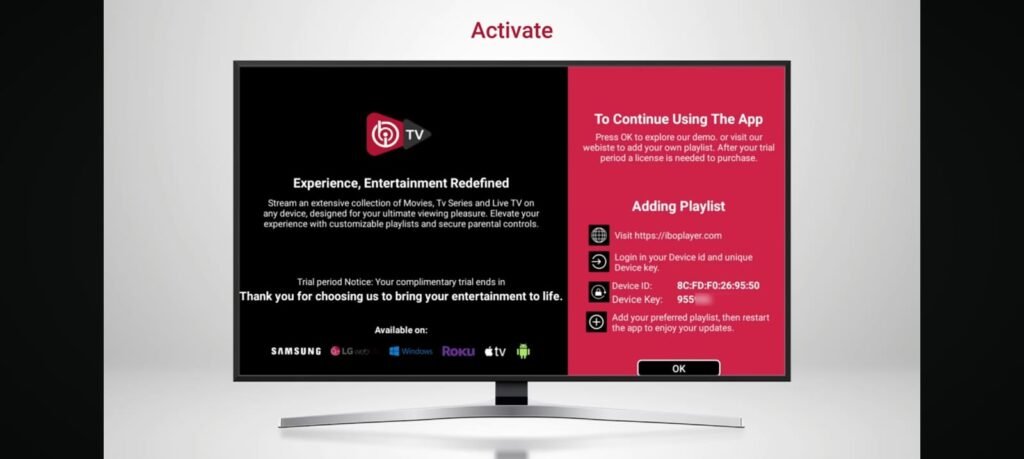
Step 2 – Open the App and Note Device Information
Once the application is installed, open it on your device.
You will see two important details on the screen:
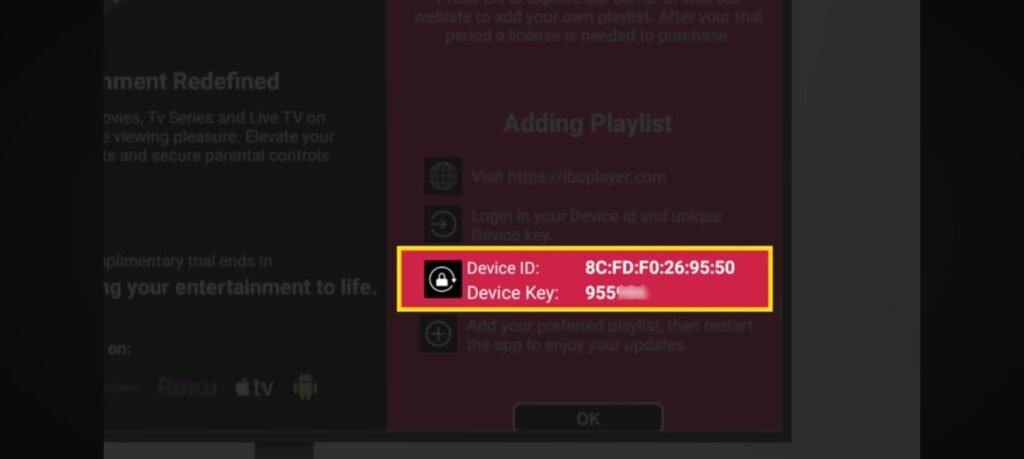
- Device ID
- Device Key
These details are extremely important because they are required during playlist activation.
It is recommended to either:
- Take a picture of the screen
- Write down the information carefully
Without these details, you cannot activate the application.
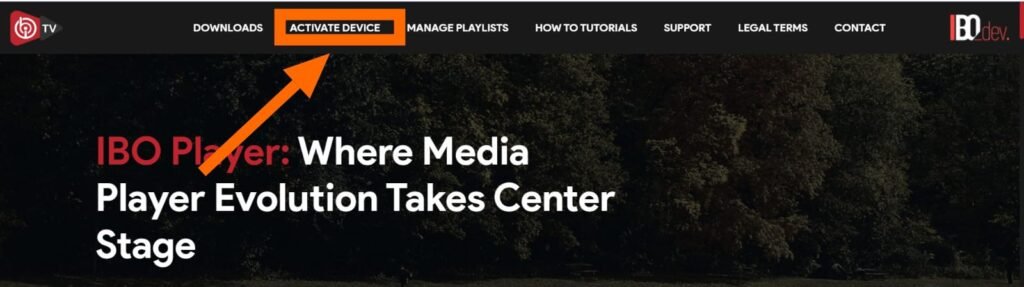
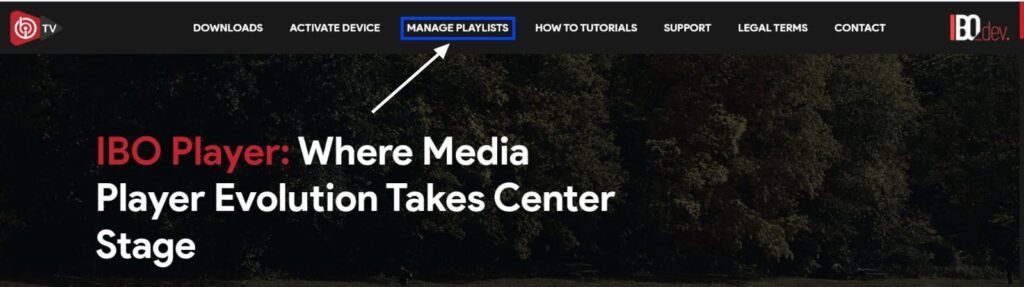
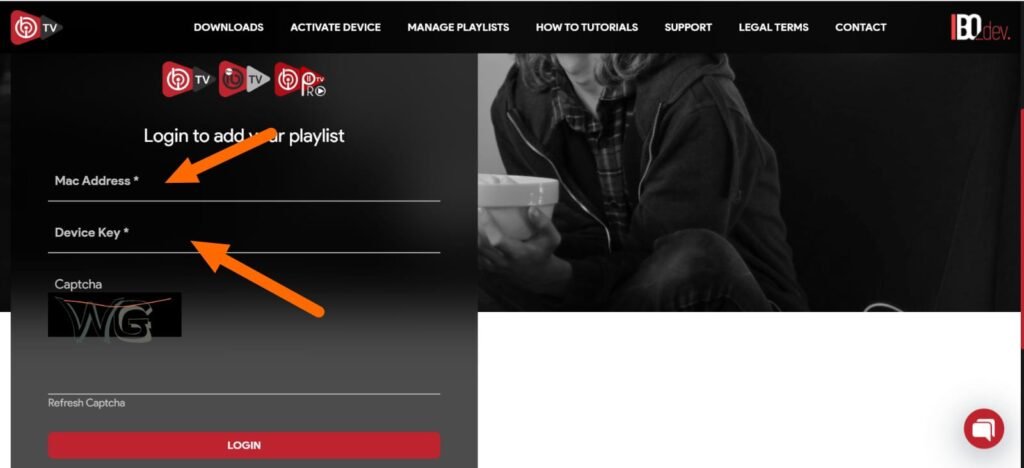
Step 3 – Open the Playlist Management Page
Now use your mobile phone or computer to access the playlist management portal.
On the page, enter:
- Device ID
- Device Key
After entering the information, you will gain access to your playlist dashboard.
Write those down.
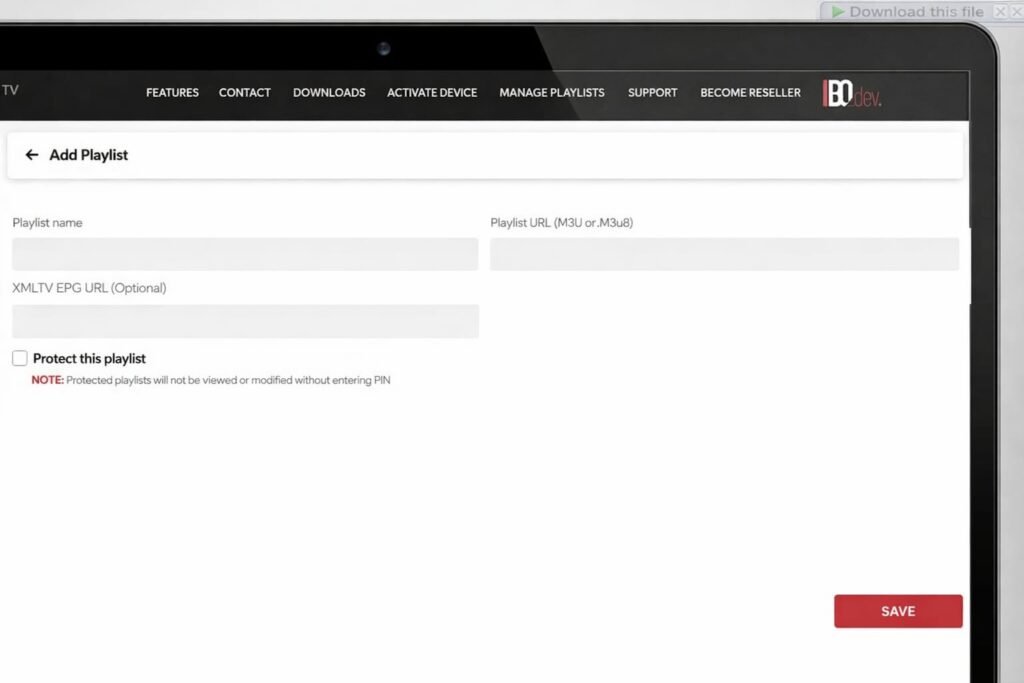
Step 4 – Add IPTV Playlist Information
This is the most important step during setup.
Now you need to enter IPTV details provided by your IPTV service provider.
Most IPTV providers offer one of the following options:
Option 1 – M3U Playlist URL
This is a playlist link that contains channels and streaming content.
Option 2 – Xtream Codes API
This usually includes:
- Portal URL
- Username
- Password
Once entered, you can also create a custom playlist name for easier organization.
After saving the playlist information, the system will upload your IPTV channels to the app.
Step 5 – Restart the Application
After successfully adding the playlist:
- Close the app completely
- Restart IBO Player
- Wait a few seconds for synchronization
Your IPTV channels, movies, and content should now appear inside the app.
You can begin streaming immediately.
Lastly, remember that you can always troubleshoot if channels do not show up after you activate IBO Player.
Common Problems While Activating IBO Player
Sometimes users face issues during activation. Most problems are usually caused by incorrect IPTV information or internet issues.
Common Activation Problems
- Channels not loading
- Black screen issue
- Invalid playlist URL
- Incorrect Xtream Codes
- Internet connection problems
- Expired IPTV subscription
- App freezing
Fortunately, most of these issues can be solved easily.
How to Fix IBO Player Not Working
If your channels are not showing after activation, try the following troubleshooting methods.
Troubleshooting Tips
- Restart your Smart TV
- Restart the IBO Player app
- Recheck your IPTV credentials
- Verify internet speed
- Remove and upload playlist again
- Update the application
- Clear app cache if possible
- Ensure IPTV subscription is active
In many cases, simply restarting the application fixes the issue.
Is IBO Player Safe to Use?
Yes, IBO Player itself is considered safe because it is only a media player. However, users should always download the app from official sources.
For security reasons:
- Avoid unofficial websites
- Never share Device Key publicly
- Use trusted IPTV providers only
- Keep the app updated
Using the official website ensures better protection and proper updates.
Advantages of Using IBO Player
There are several reasons why users continue choosing IBO Player over many other IPTV applications available today.
Major Advantages
- Easy setup process
- Professional interface
- Fast performance
- Supports external playlists
- Better streaming stability
- Modern IPTV experience
- Compatible with multiple devices
- Smooth navigation system
Its simplicity makes it especially useful for beginners who are new to IPTV streaming.
Final Thoughts
IBO Player is one of the best IPTV media players for users who want smooth, stable, and high-quality streaming. The activation process is simple and only takes a few minutes if you follow the correct steps carefully.
The most important thing to remember is that IBO Player does not provide IPTV subscriptions or channels. Users must add their own IPTV playlist from external providers.
If you follow the setup guide above, you can successfully activate IBO Player and begin watching your favorite IPTV channels without unnecessary complications.
For official downloads and playlist management, always use:
This helps you avoid fake websites, activation problems, and security risks while ensuring the best streaming experience possible.